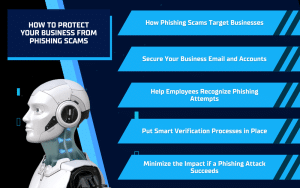
Phishing scams have become one of the most common and costly cyber threats facing businesses today. Unlike consumer scams, these attacks are designed to blend into everyday business operations, often appearing as legitimate emails from executives, vendors, or trusted partners. One convincing message is all it takes to trigger a fraudulent payment, expose sensitive data, or give attackers access to critical systems. For business owners and managers, understanding how phishing works and putting the right protections in place is no longer optional — it is an essential part of keeping the business secure and running smoothly.
How Phishing Scams Target Businesses
Phishing scams aimed at businesses are rarely random. Attackers take the time to research a company’s leadership, vendors, and internal processes so their messages feel familiar and believable. They often reference real names, current projects, or common workflows to lower suspicion and increase the chance that someone will act quickly without verifying the request.
For many businesses, these scams arrive disguised as routine emails. A message may appear to come from a company executive asking for an urgent payment, or from a vendor requesting updated banking information. Others look like legitimate security alerts or document-sharing notifications designed to steal login credentials. Because these requests often match normal day-to-day tasks, they can be difficult to spot without the right awareness and safeguards in place.
Understanding how these attacks work is the first step in preventing them. When business owners and managers know what phishing attempts typically look like, they can put smarter security controls and approval processes in place to protect their people, finances, and systems.
Secure Your Business Email and Accounts
Email is the starting point for most phishing attacks, which makes it one of the most important areas to secure. When attackers gain access to a business email account or successfully impersonate a trusted sender, they can move quickly and cause serious financial, operational, and data-related damage.
Add an Extra Layer of Login Protection
Relying on a username and password alone is no longer enough to protect business accounts. Multi-factor authentication (MFA) adds an additional verification step, such as a code sent to a phone or an authentication app, before access is granted. Even if a password is compromised through a phishing email, MFA can prevent attackers from signing in and accessing email, cloud tools, and internal systems.
Reduce Email Impersonation Risks
Email impersonation is one of the most effective tactics used in business phishing scams. Attackers send messages that appear to come from a company executive, coworker, or trusted vendor by slightly altering an email address or spoofing a company’s domain. At a quick glance, these emails can look legitimate, which is why employees may act on requests like payment approvals or banking changes without realizing anything is wrong.
Reducing this risk requires more than basic spam filtering. Proper email authentication and domain protection settings help verify which messages are truly authorized to be sent on behalf of the company. When these safeguards are in place, spoofed or fake emails are far more likely to be blocked or flagged before reaching an inbox, helping prevent executive impersonation, vendor fraud, and costly security incidents.
Help Employees Recognize Phishing Attempts
Even with strong technical protections in place, employees remain a primary target for phishing scams. Attackers rely on human behavior, such as trust, urgency, and routine, to convince someone to click a link, share information, or approve a request. Helping employees recognize these tactics is a critical layer of business protection.
What Suspicious Messages Often Look Like
Phishing emails commonly create a sense of urgency or pressure, asking for quick action related to payments, account access, or sensitive information. Messages may reference unexpected invoices, password resets, shared documents, or urgent requests from leadership. When something feels rushed, out of character, or slightly off, it is often worth slowing down and verifying the request.
Example: Real vs. Phishing Message
Legitimate Message

Phishing Message

How to Spot the Difference
- The legitimate message follows normal business processes
- The phishing message introduces urgency or requests a change
- Small details like sender addresses or missing signatures can reveal a scam
- Requests involving money or sensitive data should always be verified
Scareware and Fake Security Alerts
Scareware is a type of phishing scam that uses fear to push users into acting quickly. These scams often appear as pop-up warnings or on-screen alerts claiming a computer is infected, a security license has expired, or immediate action is required to prevent data loss. The messages may look like they come from Microsoft, antivirus software, or a trusted security provider, but they are designed to trick users into clicking links, downloading harmful software, or calling a fake support number.

Legitimate security tools do not demand immediate action through random pop-ups or ask users to call unfamiliar phone numbers. If an alert appears unexpectedly, employees should avoid clicking anything and report the message to IT for review. Recognizing scareware and knowing when to stop and ask for help can prevent malware infections, stolen credentials, and unnecessary downtime.
Make Security Awareness Part of Daily Work
Phishing awareness is most effective when it is ongoing, not a one-time training session. Regular reminders, simple examples, and short refreshers help employees stay alert without overwhelming them. When employees know what to watch for and feel comfortable reporting suspicious messages, businesses greatly reduce the likelihood of a single mistake turning into a major security issue.
Put Smart Verification Processes in Place
Phishing scams often succeed not because of poor technology, but because there is no clear process for verifying sensitive requests. When employees are unsure how to handle payment changes, vendor updates, or urgent requests from leadership, scammers can take advantage of the uncertainty. Clear verification procedures help remove guesswork and reduce risk.
Protect Payments and Vendor Changes
Any request involving payments, wire transfers, or changes to vendor banking information should be verified using a trusted, separate method. This could include a phone call to a known contact or an internal approval step outside of email. Simple verification policies can stop invoice fraud and payment redirection scams before money leaves the business.
Safeguard Payroll and Employee Information
Payroll and HR-related phishing scams often request changes to direct deposit details or personal employee information. These requests should never be approved based on an email alone. Requiring confirmation through secure portals or direct contact helps ensure sensitive employee data remains protected.
Minimize the Impact if a Phishing Attack Succeeds
Even with strong security measures in place, no system is completely immune. That’s why it’s important for businesses to plan for what happens if a phishing attempt does slip through. Limiting access and responding quickly can make the difference between a minor issue and a major disruption.
Limit Access to Critical Systems
Not every employee needs access to every system. By restricting access to only what each role requires, businesses reduce how far an attacker can go if an account is compromised. This approach helps protect sensitive data, financial systems, and critical business operations from wider exposure.
Detect and Respond Quickly
Early detection is key to reducing damage. Unusual login activity, unexpected account changes, or suspicious behavior should be addressed immediately. Having an IT partner monitoring systems and responding quickly allows businesses to contain threats, secure accounts, and prevent further impact before problems escalate.
Protect Your Business with the Right IT Partner
Phishing scams are not just an email problem — they are a business risk that can impact finances, operations, and trust. Protecting your business requires a combination of secure systems, clear processes, and informed employees who know how to recognize and respond to suspicious activity. When these pieces work together, businesses are far less likely to fall victim to costly phishing attacks.Solinkit helps businesses take a proactive approach to cybersecurity by securing email systems, strengthening account protections, and providing expert guidance that keeps technology working safely in the background. If you want confidence that your business is protected from phishing scams and other cyber threats, contact Solinkit today to learn how their managed IT and security services can support your team and your growth.