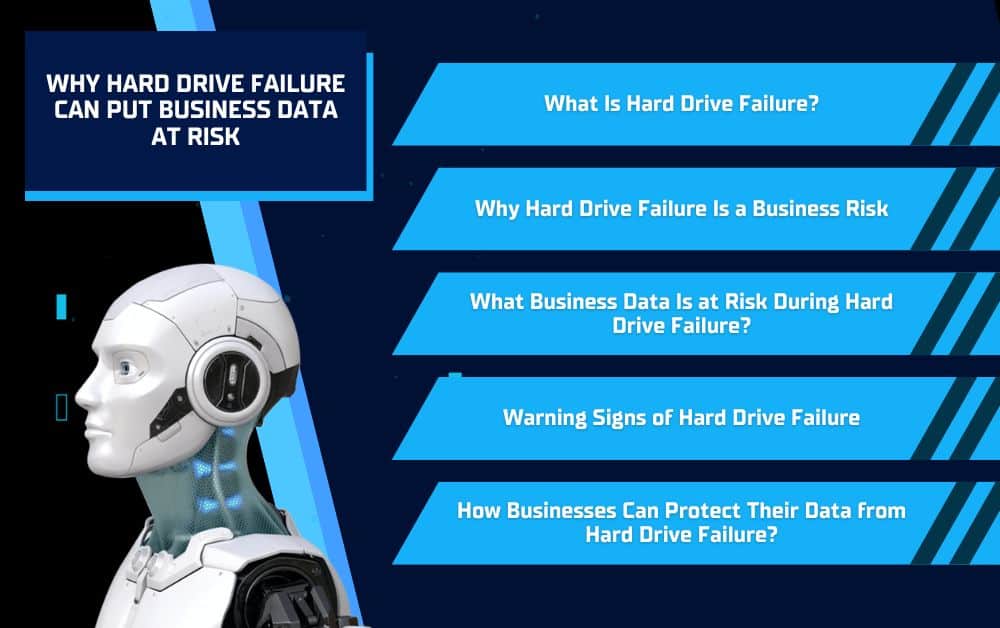
Hard drive failure can be a serious risk for businesses that rely on stored files, customer records, financial documents, software, and daily operational data. When a hard drive stops working properly, important information can become inaccessible, corrupted, or permanently lost. For a business, this can lead to downtime, lost productivity, security concerns, and expensive recovery efforts. By understanding the risks of hard drive failure and having the right backup and IT support in place, businesses can better protect their data and keep operations running smoothly.
What Is Hard Drive Failure?
Hard drive failure happens when a storage device stops working properly and can no longer reliably save, access, or protect data. This can happen to traditional hard disk drives, solid-state drives, external drives, servers, and workstations. For businesses, the issue is not just the failed device itself. The bigger concern is the important data stored on that device, especially if there is no recent backup available.
How Hard Drives Store Business Data
Businesses often use hard drives to store files, applications, customer records, invoices, contracts, financial documents, reports, and other information employees need every day. Some data may be stored on individual workstations, while other files may be kept on shared drives, servers, or external storage devices. If one of these drives fails, employees may suddenly lose access to the information they need to complete work, serve customers, or manage daily operations.
Common Causes of Hard Drive Failure
Hard drive failure can happen for several reasons, including age, overheating, physical damage, power surges, corrupted files, malware, improper shutdowns, or manufacturing defects. In some cases, the failure happens gradually with warning signs like slow performance, missing files, or frequent crashes. In other cases, the drive may stop working with little notice. That is why businesses should not wait until a hard drive fails to think about data protection, backups, and recovery planning.
Why Hard Drive Failure Is a Business Risk
Hard drive failure is a business risk because it can interrupt access to the information employees need to work. A failed drive can affect files, software, customer records, financial documents, and other important data that support daily operations. When that information is suddenly unavailable, the problem can quickly move beyond a single computer and create larger issues for productivity, customer service, and business continuity.
Data Can Become Inaccessible or Lost
When a hard drive failure occurs, files may become difficult or impossible to open. Employees may lose access to documents, spreadsheets, databases, project folders, or software files they depend on throughout the day. If the data was not backed up recently, the business may have no easy way to restore what was lost.
Downtime Can Disrupt Daily Operations
Downtime caused by hard drive failure can slow down communication, scheduling, billing, customer service, and project work. Even a short interruption can create delays when employees cannot access the systems or records they need. For businesses that depend on fast response times or accurate records, this kind of disruption can affect both internal productivity and customer experience.
Recovery Is Not Always Guaranteed
Some failed hard drives can be recovered, but recovery is not always simple or guaranteed. Professional data recovery can be expensive and time-consuming, and some files may still be damaged or permanently lost. That is why businesses should not rely on recovery as their only plan. Regular backups, proactive monitoring, and proper IT support are much safer ways to reduce the risk of data loss.
What Business Data Is at Risk During Hard Drive Failure?
Hard drive failure can put many types of business data at risk, especially when files are stored on individual computers, shared drives, servers, or external storage devices without a reliable backup plan. The type of data affected will depend on how the business stores and manages its information. However, even one failed drive can create serious problems if it contains files employees need for daily work.
Customer and Financial Records
Customer and financial records are some of the most important files a business can lose. This may include customer contact information, invoices, contracts, payment records, payroll data, tax documents, and accounting files. If these records become inaccessible, billing, payments, customer support, and financial accuracy can be affected.
Internal Files and Operational Documents
Hard drive failure can also affect internal files that keep the business running. Project folders, reports, employee documents, email archives, software files, photos, videos, design assets, and shared documents may all be stored on business devices or drives. Losing access to these files can slow down projects, create confusion, and force employees to spend time recreating work that may have already been completed.
Sensitive or Compliance-Related Information
Some businesses store sensitive or compliance-related information, such as employee records, client files, medical documents, legal information, or other confidential data. If a hard drive failure affects these files, the issue may go beyond inconvenience. Businesses may need to consider privacy, security, recordkeeping, and compliance responsibilities, especially if the data cannot be restored or if the failed drive is not handled securely.
Warning Signs of Hard Drive Failure
Hard drive failure can happen suddenly, but many drives show warning signs before they stop working completely. Recognizing these issues early can give a business time to back up important files, replace failing equipment, and prevent a larger data loss event. Employees should report unusual computer behavior instead of ignoring it, especially when the device stores important business information.
Slow Performance and Frequent Crashes
A failing hard drive may cause a computer to run slowly, freeze often, or crash without warning. Programs may take longer to open, files may load slowly, or the system may restart unexpectedly. While slow performance can have many causes, repeated issues should be checked before the drive fails completely.
Missing, Corrupted, or Inaccessible Files
One of the clearest signs of hard drive failure is trouble accessing files. Documents may disappear, fail to open, show error messages, or appear corrupted. If employees notice that files are no longer saving correctly or folders are becoming difficult to access, the business should treat it as a potential storage problem.
Unusual Noises or Boot Problems
Traditional hard drives may make clicking, grinding, or buzzing sounds when they are failing. A computer may also have trouble starting up, shutting down unexpectedly, or failing to recognize an external drive. These signs should be addressed quickly because they may indicate that the drive is close to failing.
How Businesses Can Protect Their Data from Hard Drive Failure
Businesses can reduce the risk of data loss from hard drive failure by planning ahead. While no storage device lasts forever, the right backup strategy, monitoring, and IT support can help protect important information before a drive stops working. The goal is to help the business recover quickly if a hard drive fails.
Use Automatic and Secure Backups
Regular backups are one of the most important protections against hard drive failure. Businesses should not rely on employees to manually copy files or remember to save important documents somewhere else. Automatic backups help make sure data is copied consistently and stored securely. For stronger protection, businesses may use more than one backup location, such as a local backup and a cloud-based backup, so files are not dependent on a single device.
Test Backups Before There Is an Emergency
A backup is only useful if the data can actually be restored. Businesses should test backups regularly to confirm that files are being saved correctly and can be recovered when needed. Without testing, a company may not realize there is a problem with its backup process until after a hard drive failure has already happened.
Work with an IT Provider for Proactive Support
An IT provider like Solinkit can help businesses take a more proactive approach to data protection. This may include setting up secure backup systems, monitoring device health, maintaining workstations, supporting cybersecurity, and helping replace aging equipment before it becomes a bigger risk. With the right support, businesses can reduce downtime, protect important files, and feel more confident that their data is not dependent on one failing hard drive.
Conclusion
Hard drive failure can happen unexpectedly, but data loss does not have to become a business disaster. When companies rely on stored data, one failed drive can cause downtime, confusion, and costly recovery issues. By using secure backups, testing recovery processes, monitoring device health, and working with an IT provider like Solinkit, businesses can better protect their data and keep operations running smoothly. If your business needs help strengthening its backup plan or protecting important files from hard drive failure, Solinkit can provide the proactive IT support you need.